01 / NAIT capstone
Pet care / WordPress / 2025
Tailz
From Shopify
to WordPress.
A four-month NAIT capstone for Tailz, a pet care business. Our team rebuilt its existing Shopify website in WordPress, while another student group worked on the same client brief.
My work covered WordPress setup, shared page templates, navigation and ACF integration. I built the dog-size pricing interaction and helped resolve Git and frontend asset-loading issues as design and development progressed together.
01 / Research & brief
Replacing the
Shopify template.
We began with the existing Tailz.ca website, competitor research and UI/UX references. At first, we looked for frontend improvements we could make to the current site.
Our first client meeting clarified the larger brief. The client wanted to leave Shopify and stop using the existing template. We recommended WordPress and began planning a new website.
Our four-person team had four months to turn the research and client requirements into a working website.
02 / Booking
Booking across
two providers.
Tailz used ProPetWare and MoeGo for booking and needed both services. The client wanted visitors to book without leaving the website, so we investigated consolidation and API integration.
During the project, we found API access for only one of the providers. I raised the UX concern: keeping one booking flow on the site while sending the other to an external page would make the two experiences inconsistent.
I recommended considering both booking journeys together and keeping their behaviour consistent.
03 / Design & build
Building while
the design changed.
After research and a sprint, the team worked on low-fidelity layouts. The high-fidelity design needed further revision after course review, so development began while design continued.
We chose TailPress, a WordPress starter with Tailwind support, to build quickly within the deadline. Tailwind utilities helped with the initial implementation; detailed spacing and styling needed targeted CSS as the design became more specific.
Substantial design changes also meant revisiting work already built. The challenge was balancing that rework with the remaining development time. I adjusted shared templates, margins and spacing, and helped troubleshoot Git issues and frontend scripts or styles that weren’t loading correctly.
We met almost daily to work through solutions and collaborated through Discord, Teams and GitHub. The students working on design also contributed to development. My GitHub account is meremalice.
The team’s style guide
Our Figma guide documents separate desktop and mobile typography and spacing: 24px and 18px body text, with 130px and 60px between sections. These design references informed the page margins and spacing I worked on during development.
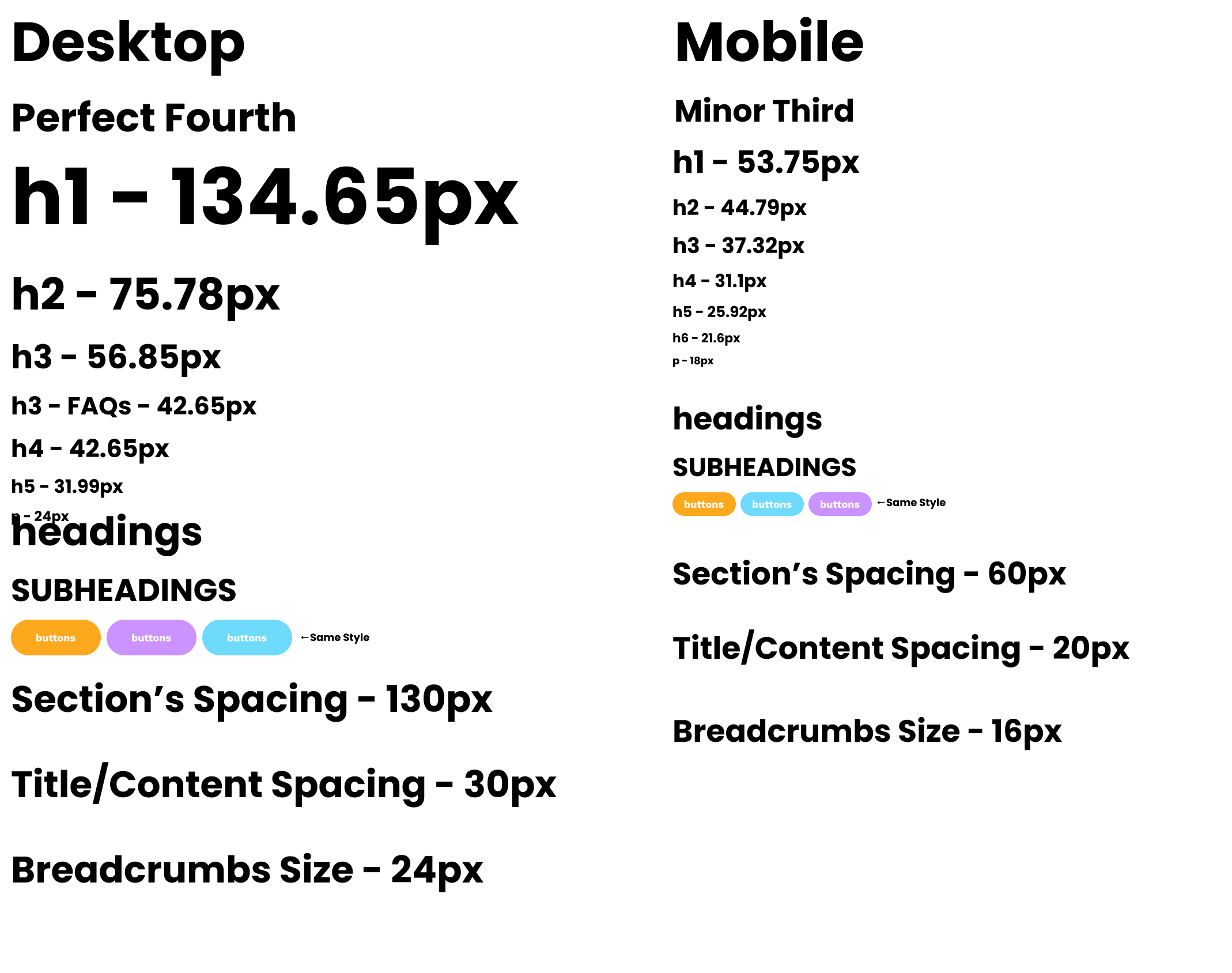 View the full style guide
A shared reference for desktop and mobile layouts. Design work is credited to the team.
04 / Pricing
One size selection,
several prices.
My hardest implementation problem was the grooming menu: each service has a different price for each dog size. Choosing XS, S, M, L or XL needs to update the cards together.
I used Advanced Custom Fields to connect the service content and size-specific prices to the WordPress template. The prices stay with their service records; the interaction reads those values instead of keeping a second price list in JavaScript.
- 01ACF fields
Title, description, features and a price for each size.
- 02WordPress template
PHP puts the price object into each card’s escaped HTML data attribute.
- 03Size selector
A native select offers XS through XL and fires a change event.
- 04Service cards
JavaScript reads the selected size and replaces each price’s text.
Grooming layouts in Figma
The desktop layout arranges service cards alongside the boost menu. On mobile, those cards form a single column and the size control becomes a dropdown. These frames show the team’s design stage, including placeholder prices and copy.
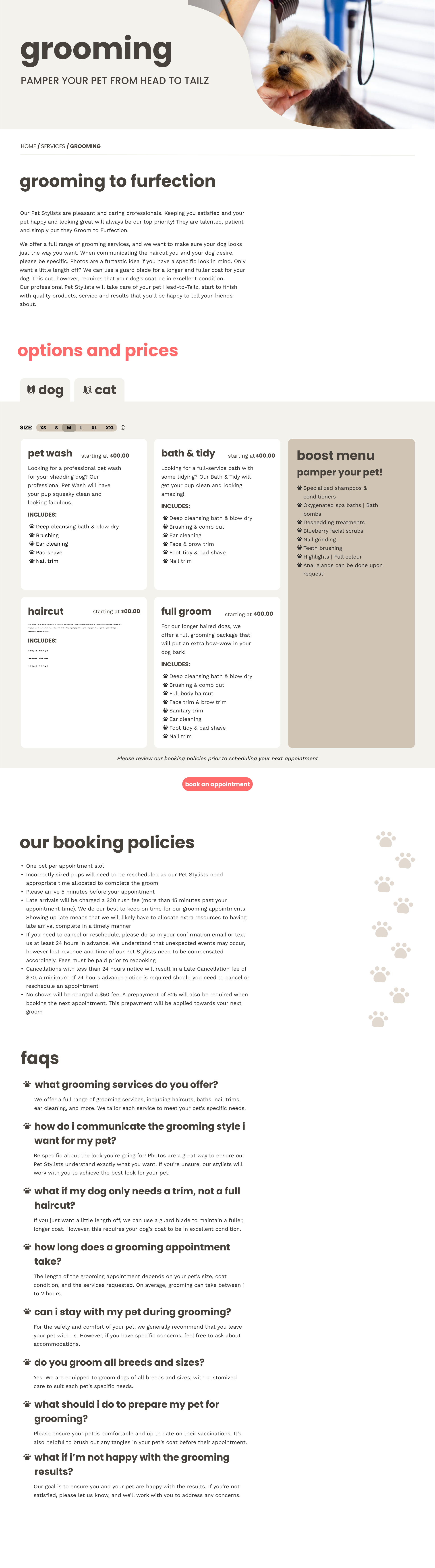 View the full desktop frame
Preview of the pricing area. The design includes XXL; the implemented selector uses XS–XL.
 View the full mobile frame
Preview of the pricing area. The frame retains placeholder prices and content.
From ACF to the cards
In the grooming template, PHP reads the service fields and encodes each service’s price object as JSON. It passes that object through esc_attr() before rendering it in data-dog-prices. The page initially displays medium-size pricing.
When the size changes, the JavaScript handler reads the relevant object from each card, looks up the selected size, and changes the existing price element. The update happens on the page without a reload.
const prices = JSON.parse(pricesData);
const price = prices[selectedSize];

if (price === 'N/A' || price === null ||
    price === undefined || price === '') {
  priceElement.textContent = 'N/A';
  return;
}

priceElement.textContent = '$' + price;
Unavailable prices show “N/A” instead of a dollar amount. The same script also handles dog and cat service tabs, showing the appropriate size selector for the active animal.
Template reference: ACF fields, size selectors and service cards.
The difficult part was keeping the content model and the interface in sync: one selected size, with a separate set of prices for every service.
06 / Handover
Editable content.
A client handover.
The new website also needed to reflect the business’s move to a new building and let the client update services and photographs.
We visited the new premises and planned to photograph the spaces. The deadline prevented that shoot, so we made the images easy to update through ACF. The site’s content was also editable, and we transferred the existing copy from the original website.
The team provided documentation for the client. It was reviewed and proofread to make the technical instructions clearer and easier to follow.
The client selected our team’s website over the other group working on the project.
We presented the work in class, then packaged the website and instructions for delivery. Our professor managed the handover to the client.
The project taught me how client requirements, design revisions and development constraints affect one another. My contribution combined the site’s shared structure with practical interactions and the debugging needed to bring the team’s work together.
Tailz was built by MMKB, a four-person NAIT capstone team. This case study focuses on my contribution to that shared project.
For freelance projects or web development roles: mdwebstudio@proton.me.
Back to selected work